Any email — from your inbox or any previous marketing platform — can now become a fully editable template in Email AI within minutes.
What’s new?
Have templates in HubSpot, ActiveCampaign, Mailchimp, or another tool? Just send the email and Email AI converts it into an editable template inside the platform instantly.
No manual rebuilding. Import → Convert → Optimize with AI.
Impact
•
Email marketing tool agnostic
— bring templates from any platform•
Import directly from your inbox
•
Onboarding new clients?
Bring their best-performing emails from their previous platform in minutes•
See an email you like from a competitor?
Drop it in and make it yours with Email AI• Turn existing campaigns into fully editable templates instantly
• Start optimizing, iterating, and launching faster
Move faster, reuse what already works, and launch campaigns without rebuilding from scratch.
How to use?
- Make sure Email AI is enabled under Labs
- Go to Marketing → Emails → Templates
- Click New
- Select Import
- Copy the dynamic email ID
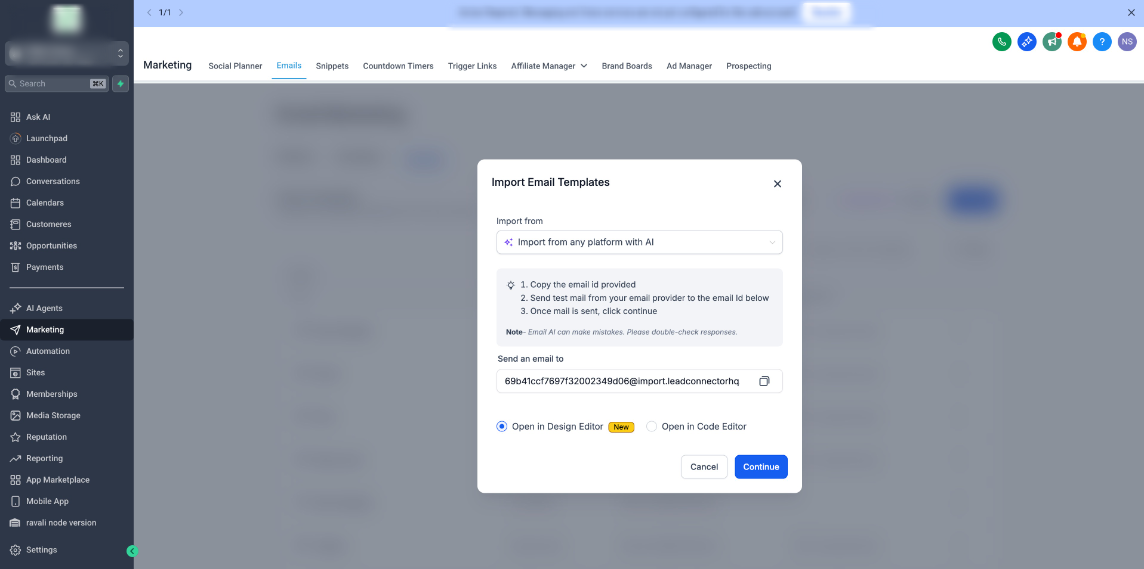
- Send the template as a test email or forward any email from your inbox
- Choose the editor you want to import it into
- Click ContinueandCreate Templateto start editing
Was this article helpful?
That’s Great!
Thank you for your feedback
Sorry! We couldn't be helpful
Thank you for your feedback
Feedback sent
We appreciate your effort and will try to fix the article